Named with client permission · Live · rolling out across the portfolio · May 2026
Case study · AI build · Anthropic Claude + Azure
Built for Neoscape

Projected $360K a year. Up to 3,600 hours of senior PM time. Freed up.
Neoscape · at full portfolio rollout.

Neoscape produces a Project Control Group (PCG) report for every active construction project, every month — one of the most time-intensive deliverables their PMs face. Until December 2025 a third-party automation partly addressed it; when that automation went offline, PMs reverted to around 3 hours of manual work per report. We rebuilt the workflow around Anthropic Claude and secure Azure resources, in Neoscape's own tenant. PM input is now ~30 minutes per report — up to 2.5 hours saved each. The build is live and rolling out across the portfolio. At full rollout across all active projects, it is projected to free up ~3,600 hours of senior PM time a year — about $360,000 at standard PM rates.

EVISENT // BUILD SPEC LIVE · ROLLING OUT
PCG Automation
CLAUDE + AZURE · IN-TENANT
$360K/yr
PM time, projected
per year
~3,600 hrs
Senior PM hours/yr
(~300/mo)
~120
PCG reports/mo
(at full rollout)
3h → 30m
Time per report
18 SECTIONS · 14 AUTO + 4 HYBRID · 2 CONTRACT TYPES
~3,600 hrs
Annual hours
projected
3h → 30m
Per-report
PM input time
18 / 18
Report sections
covered
“A build that thinks about the report the way our PMs do — and hands back a draft that only needs the judgement that actually matters.”
Mark Nathan · Managing Director Neoscape
The problem we walked into

A high-volume report portfolio. A 3-hour task. No working automation.

The PCG report is the monthly governance artefact every active construction project produces — read by principals, superintendents, internal leadership. The shape of the document is predictable. The content is anything but, and the previous automation that addressed it had gone offline.

Failure mode 1

The old automation died — and didn't get replaced.

The third-party automation that had partly handled PCG generation went offline in December 2025 and was never restored. PMs reverted to fully manual production. Around 3 hours of senior time per report, every month, across every active project in the portfolio.

Failure mode 2

Templating ≠ AI. The previous tool never learned.

The earlier solution stitched templates together mechanically — no contextual understanding of the project's trackers, registers, or contract correspondence. The client wanted a real AI build: one that reads project state and produces a draft worth reviewing, not rewriting.

Failure mode 3

Two contract types. One report shape. No portability.

The client's portfolio runs on two distinct construction contracts (AS 4902-2000 and AS 4300-1995) with different defined terms and roles. Any solution had to work across both. The earlier automation had not solved portability.

Failure mode 4

Mid-month load. Production-grade or pointless.

Dozens of reports prepared concurrently around end-of-month close. Anything that couldn't scale to that load reliably would be ignored within two cycles. The build had to be production-grade from day one.

How we built it

An AI build that thinks about the report the way the client's PMs do.

The build reads the project's existing data — trackers, registers, prior PCGs, source correspondence — and assembles each section of the report into a finished Word document, ready for PM review. A short structured form captures the 20% of content that genuinely needs human judgement (commentary, risk ratings, forward-look) before generation runs.

How it runs

Everything runs inside the client's own Microsoft 365 and Azure environment. Evisent owns the build; The client owns the data, the tenant, and the AI usage. Costs are visible on the client's own bills, and the AI vendor can be swapped — Claude was the right fit here, but Copilot or GPT could replace it on a future iteration without redesigning the build.

AI
Vendor-chosen for the job

Claude in this build — chosen because it handled the 2-month rolling context and document-shape consistency better than alternatives at scope time. Copilot & GPT considered.

Orchestration
Azure

Runs in the client's own Azure subscription, on the client's billing. Built for high-volume concurrent load — production-grade from day one.

Data
SharePoint (existing libraries)

Project trackers, registers and prior reports read directly from the SharePoint project folders the PMs already use. No new place to maintain data.

Integration
Custom, secured into your environment

Scoped permissions only — read-only on what it needs, write-only on the output folder, no broad access. The build can't delete or modify project data.

18 sections. 14 automatic. 4 hybrid.

The build covers every section a PCG report contains. Most are generated end-to-end with PM review only; a smaller set require a few lines of PM input before generation runs. The 80/20 split was a deliberate design choice — automating away the judgement work would have produced a worse report and disengaged PMs.

◉ Auto · 14 sections

Generated end-to-end

Document Control, Programme Status, S-Curve Cashflow, RFI Status, Authority Updates, Variations, Defect Status, Contractor Cashflow, Inclement Weather, Provisional Sums, Liquidated Damages, Value Management, Notice of Dispute, SD Register. Reads tracker data, prior PCGs, source docs; outputs a PM-reviewable draft.

◉ Hybrid · 4 sections

Pre-suggested + PM-confirmed

Executive Summary, Key Risks, Forward-Look, PM Commentary. AI pre-suggests using 2-month context window; PM confirms or edits before generation runs. Human-gateway approval is mandatory before save. The 20% of the report where judgement matters.

The outcome

Projected 3,600 hours a year, at full rollout. Back to the project work that actually moves projects.

Up to 2.5 hours saved per PCG report. Applied across every active project in the portfolio, that's roughly 300 hours of senior PM time a month — about 3,600 hours a year. At standard PM cost rates (~$100/hr), that's a projection of up to $360,000 a year of senior capacity — a figure based on per-report time savings at full portfolio rollout, not a figure already banked. That capacity goes back into the work PMs are actually hired to do: site visits, contract negotiation, risk management, owner relationship work.

  • ~3,600 hrs/year — ~300 hrs/month — projected at full portfolio rollout. The equivalent of nearly two senior PMs; ~$360K/year of senior capacity freed for project work.
  • Per-PCG turnaround: from around 3 hours of manual work to ~30 minutes of PM judgement + review.
  • Quality: reads project context. PMs review and lightly edit. They do not rewrite.
  • Portability: AS 4902-2000 + AS 4300-1995 contract types both supported from day one.
  • Production-grade: built for high-volume concurrent load. Live and rolling out across the portfolio.
  • In the client's tenant: Evisent controls the code; the client controls the data and runs the costs through its own subscription.
What the board sees

One build is a start. When you're ready for more, we bring the dashboard.

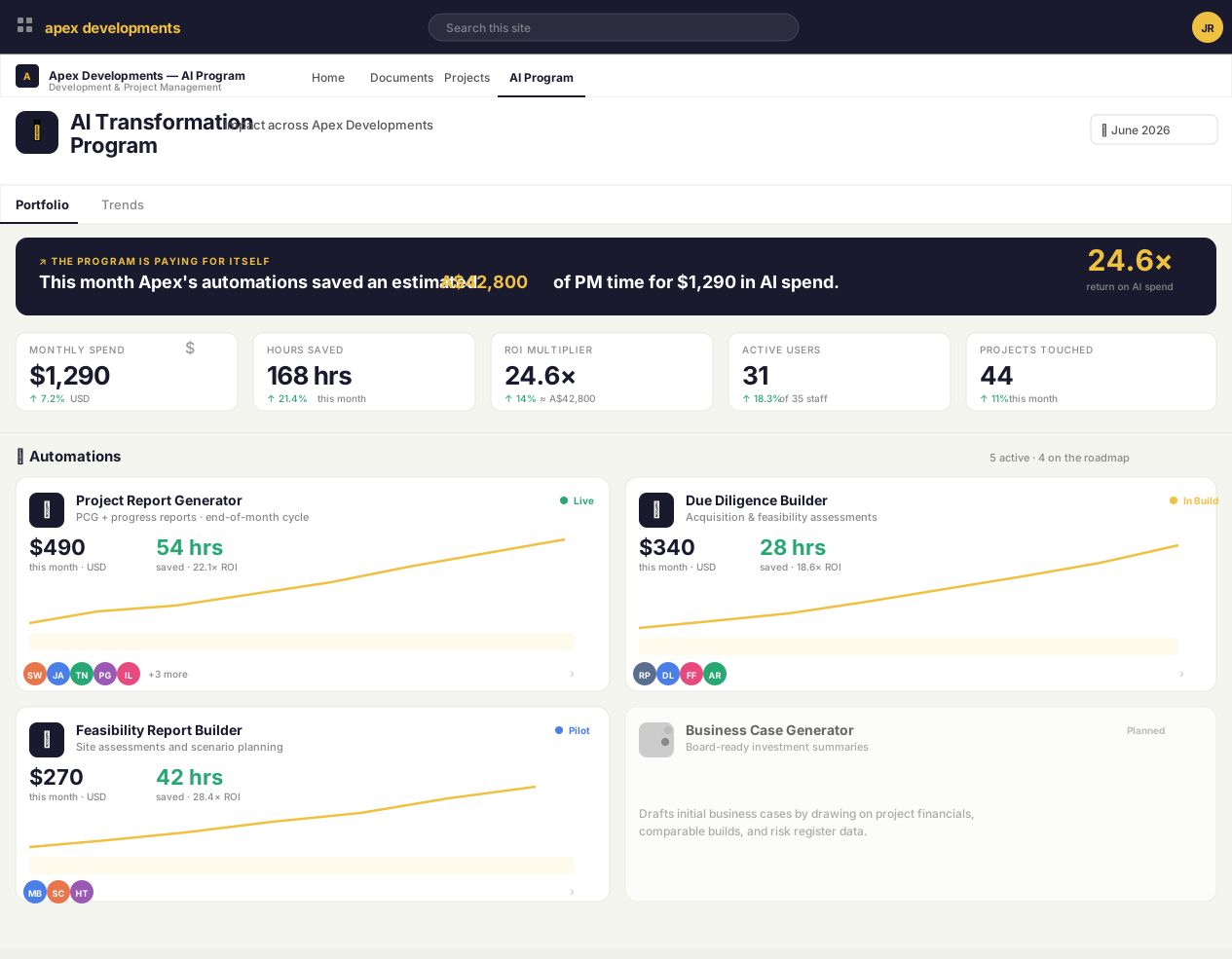
The PCG automation is a standalone build — it doesn't require anything else to run. But when a business decides to commission a second or third automation, the question quickly changes from "is this build working?" to "is the whole AI program paying off, and can we prove it?" That's when we recommend the AI Program Dashboard — a live view inside your own intranet showing cost, hours saved, ROI, who's using what, and the residual-risk register. Board-ready, refreshed every month, no spreadsheets. Available as an add-on to any Operate retainer.

AI Program Dashboard — portfolio view showing monthly spend, hours saved, ROI multiplier, active users and automations. Open the live demo
Cost & ROI

Monthly AI spend, hours saved, ROI multiplier — in one number the CFO recognises.

Every dollar of AI spend reconciled against the senior-PM hours it returned. The "is this paying for itself?" question, answered every month without anyone building a spreadsheet.

Adoption

Who actually uses each automation, and how often.

The build that nobody uses is the worst kind of build. Drill into any automation to see active users, run counts, last-used dates — and into any user to see their patterns across the program.

Assurance

The risk register your auditor would actually accept.

Eight named AI-program risks, residual ratings, named owners, last review dates, and the specific controls that justify the rating. Maintained continuously — not assembled the week before the board paper.

Live · interactive Sanitised demo data, fictitious tenant. Open in a new tab — click anything, drill into any user or automation.
Want a build like this?

Most useful AI builds look like this one.
A specific outcome, fixed-price, in your own tenant.

Build & Operate is the fixed-price version of how this engagement runs. Fixed-scope, fixed-price, written acceptance tests, optional managed operations. Built on Microsoft 365 and Azure, in your tenant — vendor-neutral on AI.

★★★★★50 Google Reviews